
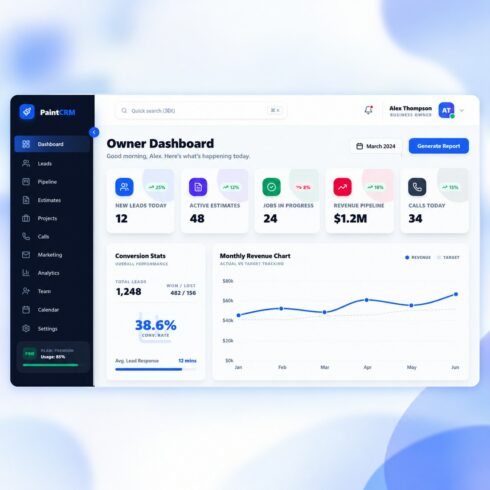
PaintCRM – Painting Contractor CRM & Business Management Dashboard
$17


| Created by | Kiaan_technology |
|---|---|
| File type | ZIP |
| File size | 124.11 KB |
| Date of Creation | October 29 2026 |
| Color | blue gray orange red |
| Rating | 5 (15) |
| Category |
PulseHub – Enterprise CRM & Agentic Customer Platform
Demo Link- http://pulsehub.kiaantechnology.online/
PulseHub is a modern Customer Relationship Management (CRM) interface designed for sales, marketing, customer support, and business operations teams. It brings customer records, deal pipelines, communications, tasks, quotes, and business analytics into a unified workspace.
Built with React 18, Vite, Tailwind CSS, and Framer Motion, PulseHub combines a polished marketing website with a comprehensive CRM dashboard and reusable interface components.
Key Features
1. Executive CRM Dashboard
– Revenue and sales pipeline KPI cards.
– Deal conversion funnel visualization.
– Recent customer activity feed.
– Quick actions for creating contacts, deals, tasks, and meetings.
2. Contact and Lead Management
– Searchable contact directory.
– Lifecycle-stage filters for subscribers, leads, opportunities, and customers.
– Customer 360° profile with interaction history.
– Associated company details, open deals, and notes.
– Inbound lead capture interface.
3. Sales Pipeline Management
– Interactive Kanban-style deal board.
– Drag-and-drop deal stage management.
– Multiple pipeline configuration interfaces.
– Deal value and probability tracking.
– Weighted pipeline metrics and revenue forecasting displays.
4. Omnichannel Inbox
– Unified inbox interface for email, WhatsApp Business Cloud, web chat, and social messages.
– Conversation thread layouts.
– Customer context sidebar.
– Conversation status filters.
– Canned responses and quick-reply interfaces.
Live channel connectivity depends on the required backend and external service configuration.
5. Tasks and Meeting Scheduling
– Task creation and prioritization.
– High, medium, and low priority indicators.
– Due dates and completion controls.
– Interactive meeting calendar.
– Attendee details, meeting agendas, and video conference link fields.
6. CPQ and Quote Management
– Configure, Price, Quote (CPQ) interface.
– Product catalogue with categories, SKUs, and pricing.
– Itemized quote creation.
– Quantity and discount controls.
– Tax and total calculations.
7. Marketing Hub
– Campaign performance dashboard.
– Click-through rate and conversion attribution displays.
– Return on ad spend (ROAS) metrics.
– Email template preview interface.
– Audience segmentation and campaign dispatch controls.
8. Enterprise Administration
– User and team management interfaces.
– Role assignment and team segmentation.
– Granular permission matrix for create, read, update, delete, export, and assignment actions.
– Custom field configuration for contacts, companies, and deals.
– Security audit log interface.
– Third-party integration configuration screens.
9. Customer and Company Management
– Dedicated company directory.
– Centralized contact records.
– Customer interaction history.
– Associated deals and company information.
– Customer lifecycle tracking.
10. Modern Interface and Navigation
– Responsive CRM application layout.
– Sidebar navigation and top header.
– Authentication modal with demo autofill.
– Reusable React components.
– Animated interface elements.
– Public marketing website and pricing page.
Technology Stack
– React 18
– Vite 5
– Tailwind CSS 3
– React Router DOM 6
– Framer Motion
– Lucide React
– Axios
– Native Fetch API
– React Context API
– LocalStorage
– PostCSS
Demo Access
PulseHub includes built-in demo authentication with quick-access login buttons.
Organization Admin
– Email: [email protected]
– Password: Password123!
Sales Agent
– Email: [email protected]
– Password: Password123!
Use the included demo login interface to explore the available CRM modules.
These are demo credentials and should not be used as production account credentials.
Installation Requirements
– Node.js v18 or later
– npm v9 or later, or Yarn/PNPM
– A modern web browser
Installation Instructions
1. Extract the project files and navigate to the `pulsehub` directory.
2. Install dependencies using `npm install`.
3. Create a local `.env` file from `.env.example`.
4. Configure `VITE_API_URL` if connecting to a backend.
5. Start the development server using `npm run dev`.
The Vite development server typically runs at `http://localhost:5173`.
Production Build
Run `npm run build` to generate optimized production assets in the `dist` directory.
The application can be deployed to static hosting platforms such as Vercel, Netlify, or Cloudflare Pages, or served through a suitably configured Nginx or Apache web server.
API Architecture and Mock Fallback
PulseHub includes an API service client designed to communicate with a REST backend using JWT Bearer authentication. When a live API is unavailable, documented mock fallbacks allow selected functions to remain testable.
A separate production backend and properly configured external integrations may be required for persistent multi-user data, live communications, and connected business services.
License
The supplied README identifies the project as distributed under the MIT License. Review the included license file and third-party dependency and asset terms before redistribution.
PulseHub provides a flexible starting point for developers building CRM dashboards, sales management applications, customer platforms, and business administration interfaces.